Snap VPN
Screenshots
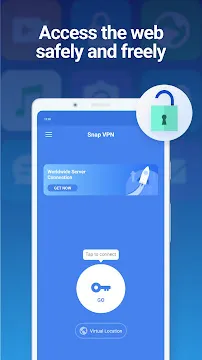
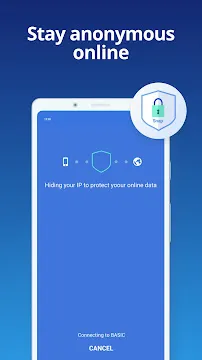

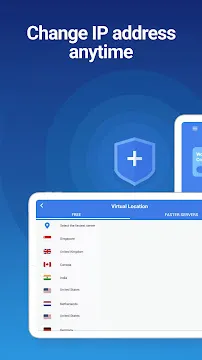
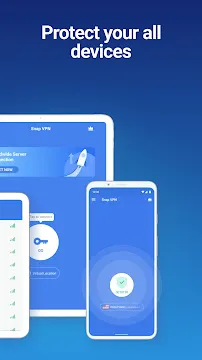
Snap VPN offers a straightforward solution for individuals who want to protect their online privacy. Many people face regional restrictions while trying to access websites. Therefore, a reliable proxy tool becomes necessary for everyday web browsing. This tool alters your virtual location by redirecting your internet traffic through secure global servers. Consequently, you can mask your actual internet protocol address with total ease.
The tool operates smoothly on mobile devices. It secures your connection when you use public networks. For example, coffee shop wireless networks often expose your data to hackers. Using this proxy app minimizes those security risks. Furthermore, it assists you in bypassing restrictive school or office firewalls.
You can view your favorite content without sudden interruptions. The interface requires no technical knowledge from the user. Then, you can enjoy a private web experience immediately after installation. Many online services block users based on geographic coordinates. However, using an encrypted connection solves this issue directly. This tool encrypts data packages before they travel across the web. Thus, third parties cannot decipher your sensitive personal details.
What Is Snap VPN and How Does It Work?
Snap VPN functions as a secure tunnel between your mobile device and the wider internet. When you open the tool, it displays a simple connect button. Tapping this button links your device to a remote server. The app encrypts all your data before it leaves your phone. Because of this encryption, internet service providers cannot monitor your browsing history. They only see that you are connected to a private network.
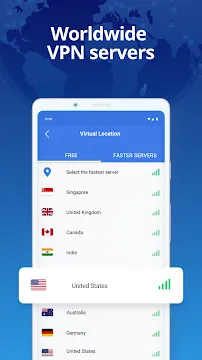
The remote server then forwards your requests to the target website. As a result, the website sees the server location instead of your home address. This mechanism helps you retain your anonymity online. The network includes numerous servers across different continents. You can choose locations like the United States, the United Kingdom, or Germany. Changing locations takes only a few seconds.
Moreover, the system handles the configuration automatically. You do not need to enter complex network settings manually. This simplicity makes the tool highly accessible for beginners. Then, you can browse international news websites with zero hassle. Security protocols work silently in the background to guard your traffic. Therefore, your daily digital activities remain private and fully protected.
Main Features of Snap VPN for Online Safety
Snap VPN includes several practical utilities that enhance your data protection. Security remains the primary objective of this specific proxy tool. The features ensure that your personal information stays away from malicious entities. Here are the core elements you get with the app:
- Data Encryption: The app utilizes advanced protocols to lock your incoming and outgoing web traffic.
- IP Masking: Your original location stays hidden behind a temporary virtual identity.
- Public Wi-Fi Shield: It defends your device from packet sniffing on unsecured hotspot networks.
- No-Log Policy: The system does not keep permanent records of your visited URLs or download activities.
- Global Server List: Users can select multiple country locations depending on their current needs.
These options give you better control over your smartphone privacy. Furthermore, the app works well with mobile data networks like LTE and 5G. It adapts to changing signals without dropping the secure tunnel. Therefore, you remain protected even while moving between different cell towers.
The continuous protection prevents accidental data leaks during daily travel. Then, you can access your bank account safely from any location. Malicious hackers cannot intercept your passwords or financial transactions. This makes the app highly reliable for remote workers.
Why Users Choose Snap VPN for Daily Browsing
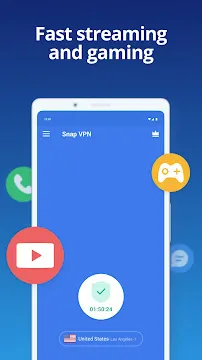
Snap VPN attracts millions of global users because it offers immediate access to restricted platforms. Many streaming platforms restrict certain shows to specific geographical areas. By using this app, you can change your virtual country quickly. Then, you can watch your preferred videos without geo-blocks. Similarly, social media networks are sometimes blocked by local network administrators. The app helps you circumvent these filters without hassle.
Another major reason for its popularity is the free service model. You can download and use the basic features without paying a subscription fee. However, free servers sometimes display advertisements to support the network maintenance. If you prefer an ad-free experience, a premium upgrade option exists.
The premium plan offers faster speeds and opens specialized streaming channels. Nevertheless, the free version satisfies the baseline requirements of casual web browsers. It assists people who only need quick access to an unavailable webpage. Furthermore, you do not need to register an account to use the free tier. This means you do not share your email address with the developer. This anonymity adds another layer of privacy to the entire experience.
How to Set Up and Optimize Snap VPN Easily
Setting up Snap VPN takes minimal effort on your modern device. First, locate the app in your official mobile store. Download the file and wait for the automated installation to finish. Open the app from your home screen icon. You will see a large start button on the main panel. Before connecting, you can open the server menu to view available regions. Select a specific country or let the system choose the fastest option. Then, tap the central button to establish the encrypted link.
Your operating system will ask for network permission during the first launch. You must approve this request so the app can manage your traffic. A small key icon will appear in your top notification bar. This icon indicates that the secure tunnel is fully active.
To disconnect, simply return to the dashboard and tap the button again. The tool shuts down instantly and restores your normal mobile network configurations. Furthermore, you can select which specific apps use the proxy connection. This split-tunneling feature helps you conserve bandwidth for important tasks. Therefore, you gain full control over your device network usage.
Important Tips for Getting the Best Speed From Snap VPN
Snap VPN speed depends on several distinct external factors. Sometimes, free servers experience high traffic volume from multiple users simultaneously. This congestion can slow down your download rates. To fix this issue, you can try switching to a different country server. Choosing a location closer to your physical position usually improves performance. For example, if you live in Europe, select a European server node. This choice reduces data travel latency significantly.
Consider the following practices to maximize your connection quality:
- Close unnecessary background apps that consume web bandwidth.
- Switch from mobile data to a stable wireless local network when possible.
- Clear the app cache regularly within your phone settings menu.
- Update the app to the latest version to receive performance patches.
- Use the premium servers if you require consistent high-definition streaming speeds.
Furthermore, avoid running multiple proxy tools at the same time. Conflicting configurations will cause errors and stop your internet connection completely. Stick to one trusted solution for your security requirements. Then, check your base internet speed before turning on the proxy. A weak initial connection always results in slower proxy performance. Therefore, ensure your main network functions properly first.
Conclusion
Snap VPN provides a practical approach to mobile privacy and content unblocking. It eliminates the need for complex software setups on your personal smartphone. The tool effectively hides your digital footprint from third-party observers. Therefore, you can browse public networks with absolute confidence. While the free tier contains advertisements, it offers functional tools for zero cost.
The straightforward design ensures that anyone can use it without confusion. Ultimately, the app fulfills its promises of encryption and location variance well. Then, you can decide if the premium version fits your long-term needs. It remains a solid choice for everyday internet protection and bypass capabilities.